<?xml version="1.0" encoding="utf-8"?>
<feed xmlns="http://www.w3.org/2005/Atom">
  <title><![CDATA[blog.nixhub.de]]></title>
  
  <link href="/atom.xml" rel="self"/>
  <link href="http://blog.nixhub.de/"/>
  <updated>2016-02-06T17:35:53.319Z</updated>
  <id>http://blog.nixhub.de/</id>
  
  <author>
    <name><![CDATA[Michael Göhler]]></name>
    
  </author>
  
  <generator uri="http://hexo.io/">Hexo</generator>
  
  <entry>
    <title><![CDATA[Add port forwarding to running SSH sessions]]></title>
    <link href="http://blog.nixhub.de/2016/01/add-port-forwarding-to-running-ssh-session/"/>
    <id>http://blog.nixhub.de/2016/01/add-port-forwarding-to-running-ssh-session/</id>
    <published>2016-01-25T20:13:09.000Z</published>
    <updated>2016-02-06T17:35:53.319Z</updated>
    <content type="html"><![CDATA[<p>Recently I got a tip about subsequent adding of port forwardings to SSH Sessions without logout/login. As I work a lot with cloud technology and therefore use openssh very frequently, I found this very handy and use it several times a day.<br><a id="more"></a></p>
<p>Basically you enter openssh’s escape sequence <code>~</code> (only recognized immediately after newline), followed by <code>Shift + C</code>. This should give you a <code>ssh&gt;</code> prompt. After that, you can use the port forwarding command option syntax without the leading dash.</p>
<figure class="highlight plain"><table><tr><td class="gutter"><pre><span class="line">1</span><br></pre></td><td class="code"><pre><span class="line">user@sshhost $ ~C&#10;ssh&#62; L8080:localhost:8080&#10;Forwarding port.&#10;&#10;user@sshhost $</span><br></pre></td></tr></table></figure>
<p>You can also cancel an existing port forwarding.</p>
<figure class="highlight plain"><table><tr><td class="gutter"><pre><span class="line">1</span><br></pre></td><td class="code"><pre><span class="line">user@sshhost $ ~C&#10;ssh&#62; KL8080&#10;Canceled forwarding.&#10;&#10;user@sshhost $</span><br></pre></td></tr></table></figure>
<p>If you are connected through multiple nested SSH connections, you can choose to modify the next deeper nested connection by adding one more <code>~</code> escape character.</p>
<p>There are additional useful escape sequences (for example to terminate hanging connections by <code>~.</code>).</p>
<figure class="highlight plain"><table><tr><td class="gutter"><pre><span class="line">1</span><br></pre></td><td class="code"><pre><span class="line">user@sshhost $ ~?&#10;Supported escape sequences:&#10; ~.   - terminate connection (and any multiplexed sessions)&#10; ~B   - send a BREAK to the remote system&#10; ~C   - open a command line&#10; ~R   - request rekey&#10; ~V/v - decrease/increase verbosity (LogLevel)&#10; ~^Z  - suspend ssh&#10; ~#   - list forwarded connections&#10; ~&#38;   - background ssh (when waiting for connections to terminate)&#10; ~?   - this message&#10; ~~   - send the escape character by typing it twice&#10;(Note that escapes are only recognized immediately after newline.)</span><br></pre></td></tr></table></figure>
<p>Cheers,<br>visit</p>
]]></content>
    <summary type="html">
    <![CDATA[<p>Recently I got a tip about subsequent adding of port forwardings to SSH Sessions without logout/login. As I work a lot with cloud technology and therefore use openssh very frequently, I found this very handy and use it several times a day.<br>]]>
    
    </summary>
    
      <category term="Cloud" scheme="http://blog.nixhub.de/tag/Cloud/"/>
    
      <category term="Firewall" scheme="http://blog.nixhub.de/tag/Firewall/"/>
    
      <category term="Linux" scheme="http://blog.nixhub.de/tag/Linux/"/>
    
      <category term="SSH" scheme="http://blog.nixhub.de/tag/SSH/"/>
    
      <category term="General" scheme="http://blog.nixhub.de/category/General/"/>
    
  </entry>
  
  <entry>
    <title><![CDATA[Using fleetctl to run clustered Docker services]]></title>
    <link href="http://blog.nixhub.de/2015/05/using-fleetctl-to-run-clustered-docker-services/"/>
    <id>http://blog.nixhub.de/2015/05/using-fleetctl-to-run-clustered-docker-services/</id>
    <published>2015-05-02T10:00:00.000Z</published>
    <updated>2016-01-17T00:39:22.063Z</updated>
    <content type="html"><![CDATA[<p>After I’ve <a href="/2015/05/run-your-own-coreos-cluster-on-digitalocean/">started my CoreOS cluster</a>, I demonstrate how to run a sample service on it. In this case a Tomcat 8 Docker container controlled by fleet.<br><a id="more"></a></p>
<p>I created a <code>Dockerfile</code>, which creates a custom container based on <a href="https://hub.docker.com/r/_/tomcat/" target="_blank" rel="external">the official Tomcat 8 image</a>. Additionally it adds the official sample application provided on <a href="https://tomcat.apache.org/tomcat-8.0-doc/appdev/sample/" target="_blank" rel="external">apache.org</a>.</p>
<figure class="highlight bash"><figcaption><span>Dockerfile</span></figcaption><table><tr><td class="gutter"><pre><span class="line">1</span><br><span class="line">2</span><br><span class="line">3</span><br><span class="line">4</span><br><span class="line">5</span><br><span class="line">6</span><br><span class="line">7</span><br><span class="line">8</span><br><span class="line">9</span><br></pre></td><td class="code"><pre><span class="line">FROM tomcat:<span class="number">8</span>-jre8</span><br><span class="line">MAINTAINER visit</span><br><span class="line"></span><br><span class="line">ENV TOMCAT_VERSION <span class="number">8.0</span></span><br><span class="line">RUN curl -SL \</span><br><span class="line">  -o /usr/<span class="built_in">local</span>/tomcat/webapps/sample.war \</span><br><span class="line">  <span class="string">"https://tomcat.apache.org/tomcat-<span class="variable">$&#123;TOMCAT_VERSION&#125;</span>-doc/appdev/sample/sample.war"</span></span><br><span class="line"></span><br><span class="line">CMD [<span class="string">"catalina.sh"</span>, <span class="string">"run"</span>]</span><br></pre></td></tr></table></figure>
<p>To make this Dockerfile available to all workers in my cluster, I uploaded it to etcd. The path is completely free to choose.</p>
<figure class="highlight bash"><table><tr><td class="gutter"><pre><span class="line">1</span><br></pre></td><td class="code"><pre><span class="line">$ etcdctl <span class="built_in">set</span> /units/tomcat8/Dockerfile &lt; ./Dockerfile</span><br></pre></td></tr></table></figure>
<p>Now I could create a service file for fleet. The instance notation (<code>@</code>) and specifiers (<code>%p, %i</code>) allow to start as many instances as I like, all from one single service file. For details on that review <code>man 5 systemd.service</code> and <code>man 5 systemd.units</code>. I also specified <code>role=worker</code> in the X-Fleet section, to let fleet automatically choose a suitable instance in my cluster.</p>
<figure class="highlight bash"><figcaption><span>tomcat8@.service</span></figcaption><table><tr><td class="gutter"><pre><span class="line">1</span><br><span class="line">2</span><br><span class="line">3</span><br><span class="line">4</span><br><span class="line">5</span><br><span class="line">6</span><br><span class="line">7</span><br><span class="line">8</span><br><span class="line">9</span><br><span class="line">10</span><br><span class="line">11</span><br><span class="line">12</span><br><span class="line">13</span><br><span class="line">14</span><br><span class="line">15</span><br><span class="line">16</span><br><span class="line">17</span><br><span class="line">18</span><br><span class="line">19</span><br></pre></td><td class="code"><pre><span class="line">[Unit]</span><br><span class="line">Description=Tomcat <span class="number">8</span> servlet container</span><br><span class="line">After=docker.service</span><br><span class="line">Requires=docker.service</span><br><span class="line"></span><br><span class="line">[Service]</span><br><span class="line">EnvironmentFile=/etc/environment</span><br><span class="line">ExecStartPre=-/usr/bin/docker <span class="built_in">kill</span> %p-%i</span><br><span class="line">ExecStartPre=-/usr/bin/docker rm %p-%i</span><br><span class="line">ExecStartPre=/usr/bin/mkdir -p /tmp/%p.%i</span><br><span class="line">ExecStartPre=/usr/bin/bash -c <span class="string">"etcdctl get /units/%p/Dockerfile &gt; /tmp/%p.%i/Dockerfile"</span></span><br><span class="line">ExecStart=/usr/bin/bash -c <span class="string">"docker run -rm --name %p-%i -p 8080:8080 <span class="variable">$(docker build /tmp/%p.%i | awk '/^Successfully built/ &#123;print $3&#125;')</span>"</span></span><br><span class="line">ExecStop=/usr/bin/docker stop %p-%i</span><br><span class="line">Restart=always</span><br><span class="line">TimeoutStartSec=<span class="number">0</span></span><br><span class="line"></span><br><span class="line">[X-Fleet]</span><br><span class="line">Conflicts=%p@*.service</span><br><span class="line">MachineMetadata=role=worker</span><br></pre></td></tr></table></figure>
<p>Last not least, I registered the service in fleet and started some instances.</p>
<figure class="highlight bash"><table><tr><td class="gutter"><pre><span class="line">1</span><br><span class="line">2</span><br><span class="line">3</span><br></pre></td><td class="code"><pre><span class="line">$ fleetctl submit tomcat8@.service</span><br><span class="line">$ fleetctl start tomcat8@<span class="number">1</span></span><br><span class="line">$ fleetctl start tomcat8@<span class="number">2</span></span><br></pre></td></tr></table></figure>
<p>Cheers,<br>visit</p>
]]></content>
    <summary type="html">
    <![CDATA[<p>After I’ve <a href="/2015/05/run-your-own-coreos-cluster-on-digitalocean/">started my CoreOS cluster</a>, I demonstrate how to run a sample service on it. In this case a Tomcat 8 Docker container controlled by fleet.<br>]]>
    
    </summary>
    
      <category term="Cloud" scheme="http://blog.nixhub.de/tag/Cloud/"/>
    
      <category term="CoreOS" scheme="http://blog.nixhub.de/tag/CoreOS/"/>
    
      <category term="Docker" scheme="http://blog.nixhub.de/tag/Docker/"/>
    
      <category term="Fleet" scheme="http://blog.nixhub.de/tag/Fleet/"/>
    
      <category term="Linux" scheme="http://blog.nixhub.de/tag/Linux/"/>
    
      <category term="etcd" scheme="http://blog.nixhub.de/tag/etcd/"/>
    
      <category term="General" scheme="http://blog.nixhub.de/category/General/"/>
    
  </entry>
  
  <entry>
    <title><![CDATA[Run your own CoreOS cluster on DigitalOcean]]></title>
    <link href="http://blog.nixhub.de/2015/05/run-your-own-coreos-cluster-on-digitalocean/"/>
    <id>http://blog.nixhub.de/2015/05/run-your-own-coreos-cluster-on-digitalocean/</id>
    <published>2015-05-01T14:32:16.000Z</published>
    <updated>2016-01-16T22:40:37.506Z</updated>
    <content type="html"><![CDATA[<p>After I’ve <a href="/2015/05/working-with-coreos-and-docker-on-digitalocean/">set up my DigitalOcean environment</a>, I show how to launch a CoreOS cluster on it. To remain as relevant to productive experience as possible, I decided to run a Testing Cluster as described in the <a href="https://coreos.com/docs/cluster-management/setup/cluster-architectures/#easy-development/testing-cluster" target="_blank" rel="external">CoreOS documentation</a>.<br><a id="more"></a></p>
<p>The first droplet is my <code>etcd</code> machine. Basically it runs a single <code>etcd</code> service, which is used as backend for <code>fleet</code> on all machines of my cluster. It was created with the following user-data:</p>
<figure class="highlight bash"><figcaption><span>user-data</span></figcaption><table><tr><td class="gutter"><pre><span class="line">1</span><br><span class="line">2</span><br><span class="line">3</span><br><span class="line">4</span><br><span class="line">5</span><br><span class="line">6</span><br><span class="line">7</span><br><span class="line">8</span><br><span class="line">9</span><br><span class="line">10</span><br><span class="line">11</span><br><span class="line">12</span><br><span class="line">13</span><br><span class="line">14</span><br><span class="line">15</span><br><span class="line">16</span><br><span class="line">17</span><br><span class="line">18</span><br><span class="line">19</span><br><span class="line">20</span><br><span class="line">21</span><br><span class="line">22</span><br><span class="line">23</span><br><span class="line">24</span><br><span class="line">25</span><br><span class="line">26</span><br><span class="line">27</span><br><span class="line">28</span><br><span class="line">29</span><br><span class="line">30</span><br><span class="line">31</span><br><span class="line">32</span><br><span class="line">33</span><br><span class="line">34</span><br></pre></td><td class="code"><pre><span class="line"><span class="comment">#cloud-config</span></span><br><span class="line"></span><br><span class="line">coreos:</span><br><span class="line">  etcd:</span><br><span class="line">    addr: <span class="variable">$public_ipv4</span>:<span class="number">4001</span></span><br><span class="line">    peer-addr: <span class="variable">$public_ipv4</span>:<span class="number">7001</span></span><br><span class="line">  fleet:</span><br><span class="line">    public-ip: <span class="variable">$public_ipv4</span></span><br><span class="line">    metadata: <span class="string">"disk=ssd,platform=digitalocean,role=services"</span></span><br><span class="line">  units:</span><br><span class="line">    - name: etcd.service</span><br><span class="line">      <span class="built_in">command</span>: start</span><br><span class="line">    - name: fleet.service</span><br><span class="line">      <span class="built_in">command</span>: start</span><br><span class="line">    - name: docker-tcp.socket</span><br><span class="line">      <span class="built_in">command</span>: start</span><br><span class="line">      <span class="built_in">enable</span>: <span class="literal">true</span></span><br><span class="line">      content: |</span><br><span class="line">        [Unit]</span><br><span class="line">        Description=Docker Socket <span class="keyword">for</span> the API</span><br><span class="line"></span><br><span class="line">        [Socket]</span><br><span class="line">        ListenStream=<span class="variable">$public_ipv4</span>:<span class="number">2375</span></span><br><span class="line">        BindIPv6Only=both</span><br><span class="line">        Service=docker.service</span><br><span class="line"></span><br><span class="line">        [Install]</span><br><span class="line">        WantedBy=sockets.target</span><br><span class="line">write_files:</span><br><span class="line">  - path: /etc/profile.d/aliases.sh</span><br><span class="line">    permissions: <span class="number">0644</span></span><br><span class="line">    owner: root</span><br><span class="line">    content: |</span><br><span class="line">      <span class="built_in">alias</span> ll=<span class="string">'ls -l'</span></span><br></pre></td></tr></table></figure>
<p>The exposed docker socket is not relevant for our cluster to function. I just used it to test docker images before deploying them to the whole cluster.</p>
<p>After the <code>etcd</code> droplet is running, <code>fleetctl</code> shows one machine with <code>role=service</code> as metadata. The metadata is used by fleet to decide, where clustered services should be started. I use <code>role</code> to distinguish between the one <code>services</code> machine and all other <code>worker</code> machines.</p>
<figure class="highlight bash"><table><tr><td class="gutter"><pre><span class="line">1</span><br><span class="line">2</span><br><span class="line">3</span><br></pre></td><td class="code"><pre><span class="line">$ fleetctl list-machines</span><br><span class="line">MACHINE		IP		METADATA</span><br><span class="line">cfb065fa...	<span class="number">46.101</span>.xxx.xxx	disk=ssd,platform=digitalocean,role=services</span><br></pre></td></tr></table></figure>
<p>To create the worker machines I need to know the IP of the <code>etcd</code> droplet just created and insert it in the user-data of the workers. With that, workers can be created as many as I like, using the following user-data:</p>
<figure class="highlight bash"><figcaption><span>user-data</span></figcaption><table><tr><td class="gutter"><pre><span class="line">1</span><br><span class="line">2</span><br><span class="line">3</span><br><span class="line">4</span><br><span class="line">5</span><br><span class="line">6</span><br><span class="line">7</span><br><span class="line">8</span><br><span class="line">9</span><br><span class="line">10</span><br><span class="line">11</span><br><span class="line">12</span><br><span class="line">13</span><br><span class="line">14</span><br><span class="line">15</span><br><span class="line">16</span><br><span class="line">17</span><br><span class="line">18</span><br><span class="line">19</span><br><span class="line">20</span><br><span class="line">21</span><br><span class="line">22</span><br><span class="line">23</span><br><span class="line">24</span><br><span class="line">25</span><br><span class="line">26</span><br><span class="line">27</span><br><span class="line">28</span><br><span class="line">29</span><br><span class="line">30</span><br><span class="line">31</span><br><span class="line">32</span><br><span class="line">33</span><br><span class="line">34</span><br><span class="line">35</span><br><span class="line">36</span><br><span class="line">37</span><br><span class="line">38</span><br><span class="line">39</span><br><span class="line">40</span><br><span class="line">41</span><br><span class="line">42</span><br><span class="line">43</span><br><span class="line">44</span><br></pre></td><td class="code"><pre><span class="line"><span class="comment">#cloud-config</span></span><br><span class="line"></span><br><span class="line">coreos:</span><br><span class="line">  fleet:</span><br><span class="line">    public-ip: <span class="variable">$public_ipv4</span></span><br><span class="line">    metadata: <span class="string">"disk=ssd,platform=digitalocean,role=worker"</span></span><br><span class="line">    etcd_servers: <span class="string">"http://46.101.xxx.xxx:4001"</span></span><br><span class="line">  units:</span><br><span class="line">    - name: etcd.service</span><br><span class="line">      mask: <span class="literal">true</span></span><br><span class="line">    - name: fleet.service</span><br><span class="line">      <span class="built_in">command</span>: start</span><br><span class="line">    - name: setup-etcdctl-env.service</span><br><span class="line">      <span class="built_in">command</span>: start</span><br><span class="line">      content: |</span><br><span class="line">          [Unit]</span><br><span class="line">          Description=Setup etcdctl env vars</span><br><span class="line">          Wants=coreos-setup-environment.service</span><br><span class="line">          After=coreos-setup-environment.service</span><br><span class="line"></span><br><span class="line">          [Service]</span><br><span class="line">          Type=oneshot</span><br><span class="line">          RemainAfterExit=<span class="literal">true</span></span><br><span class="line">          ExecStart=/bin/bash -c <span class="string">"source /etc/profile.d/etcdctl.sh; env | grep -E 'ETCDCTL|FLEETCTL|INSTANCE_ID' &gt;&gt;  /etc/environment"</span></span><br><span class="line">          [Install]</span><br><span class="line">          WantedBy=multi-user.target</span><br><span class="line">write_files:</span><br><span class="line">  - path: /etc/profile.d/etcdctl.sh</span><br><span class="line">    permissions: <span class="number">0644</span></span><br><span class="line">    owner: core</span><br><span class="line">    content: |</span><br><span class="line">      <span class="built_in">export</span> ETCDCTL_PEERS=<span class="string">"http://46.101.xxx.xxx:4001"</span></span><br><span class="line">  - path: /etc/profile.d/fleetctl.sh</span><br><span class="line">    permissions: <span class="number">0644</span></span><br><span class="line">    owner: core</span><br><span class="line">    content: |</span><br><span class="line">      <span class="built_in">export</span> FLEETCTL_ENDPOINT=unix:///var/run/fleet.sock</span><br><span class="line">      <span class="built_in">export</span> FLEETCTL_EXPERIMENTAL_API=<span class="literal">true</span></span><br><span class="line">write_files:</span><br><span class="line">  - path: /etc/profile.d/aliases.sh</span><br><span class="line">    permissions: <span class="number">0644</span></span><br><span class="line">    owner: root</span><br><span class="line">    content: |</span><br><span class="line">      <span class="built_in">alias</span> ll=<span class="string">'ls -l'</span></span><br></pre></td></tr></table></figure>
<p>Instead of running <code>etcd</code> on every worker, I configured <code>fleet</code> to use the one from my <code>etcd</code> droplet. The <code>setup-etcdctl-env.service</code> makes it possible to use the <code>etcdctl</code> command from within <code>fleet</code> unit files, which I’ll describe in the next post.</p>
<p>To do failover testing with <code>fleet</code> I needed at least two workers.</p>
<figure class="highlight bash"><table><tr><td class="gutter"><pre><span class="line">1</span><br><span class="line">2</span><br><span class="line">3</span><br><span class="line">4</span><br><span class="line">5</span><br></pre></td><td class="code"><pre><span class="line">$ fleetctl list-machines</span><br><span class="line">MACHINE		IP		METADATA</span><br><span class="line"><span class="number">9</span>c4f0453...	<span class="number">46.101</span>.xxx.xxx	disk=ssd,platform=digitalocean,role=worker</span><br><span class="line">c0a4dd67...	<span class="number">46.101</span>.xxx.xxx	disk=ssd,platform=digitalocean,role=worker</span><br><span class="line">cfb065fa...	<span class="number">46.101</span>.xxx.xxx	disk=ssd,platform=digitalocean,role=services</span><br></pre></td></tr></table></figure>
<p>I can access each of them by:</p>
<figure class="highlight bash"><table><tr><td class="gutter"><pre><span class="line">1</span><br><span class="line">2</span><br><span class="line">3</span><br></pre></td><td class="code"><pre><span class="line">$ fleetctl ssh cf</span><br><span class="line">$ fleetctl ssh c0</span><br><span class="line">$ fleetctl ssh <span class="number">9</span></span><br></pre></td></tr></table></figure>
<p>Cheers,<br>visit</p>
]]></content>
    <summary type="html">
    <![CDATA[<p>After I’ve <a href="/2015/05/working-with-coreos-and-docker-on-digitalocean/">set up my DigitalOcean environment</a>, I show how to launch a CoreOS cluster on it. To remain as relevant to productive experience as possible, I decided to run a Testing Cluster as described in the <a href="https://coreos.com/docs/cluster-management/setup/cluster-architectures/#easy-development/testing-cluster">CoreOS documentation</a>.<br>]]>
    
    </summary>
    
      <category term="Cloud" scheme="http://blog.nixhub.de/tag/Cloud/"/>
    
      <category term="CoreOS" scheme="http://blog.nixhub.de/tag/CoreOS/"/>
    
      <category term="Docker" scheme="http://blog.nixhub.de/tag/Docker/"/>
    
      <category term="Fleet" scheme="http://blog.nixhub.de/tag/Fleet/"/>
    
      <category term="Linux" scheme="http://blog.nixhub.de/tag/Linux/"/>
    
      <category term="etcd" scheme="http://blog.nixhub.de/tag/etcd/"/>
    
      <category term="General" scheme="http://blog.nixhub.de/category/General/"/>
    
  </entry>
  
  <entry>
    <title><![CDATA[Working with CoreOS and Docker on DigitalOcean]]></title>
    <link href="http://blog.nixhub.de/2015/05/working-with-coreos-and-docker-on-digitalocean/"/>
    <id>http://blog.nixhub.de/2015/05/working-with-coreos-and-docker-on-digitalocean/</id>
    <published>2015-05-01T13:05:43.000Z</published>
    <updated>2016-01-16T20:10:11.088Z</updated>
    <content type="html"><![CDATA[<p>While I’m currently familiarizing myself with <a href="https://coreos.com/" target="_blank" rel="external">CoreOS</a> and <a href="https://www.docker.com/" target="_blank" rel="external">Docker</a>, I thought it would be nice to try <a href="https://cloud.digitalocean.com/" target="_blank" rel="external">DigitalOcean</a> as a hosting provider for this, because of the publicity that is made for them. So let me share my experience…<br><a id="more"></a></p>
<p>First, I wanted a nice way to integrate DigitalOcean’s API into my desktop environment. It turns out, there is a Python2 based <a href="https://github.com/andrewsomething/digitalocean-indicator" target="_blank" rel="external">digitalocean-indicator</a> system tray application around, which can be installed from the <a href="https://aur.archlinux.org/packages/digitalocean-indicator/" target="_blank" rel="external">AUR</a>, if you’re an <a href="https://www.archlinux.org/" target="_blank" rel="external">Arch Linux</a> user like me.</p>
<figure class="highlight bash"><table><tr><td class="gutter"><pre><span class="line">1</span><br></pre></td><td class="code"><pre><span class="line">$ pacaur -Sa python2-digitalocean digitalocean-indicator</span><br></pre></td></tr></table></figure>
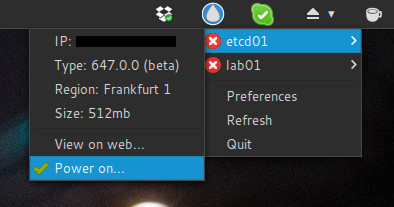
<p>After that I, created a DigitalOcean account to test it. It work flawlessly and has a nice minimalist interface:</p>
<center><img src="/2015/05/working-with-coreos-and-docker-on-digitalocean/digitalocean-indicator.jpg" alt="digitalocean-indicator.jpg" title=""></center>

<p>At this point I was able to start and stop containers from my desktop, but that’s not enough for a really good user experience.</p>
<p>As some of you may know, there is a lot of work done via SSH terminals if you use a cloud provider like DigitalOcean. Even more if you use CoreOS’s fleet. You usually control your container instances, system services and cluster components all via SSH. You should try to do as much of this, as possible from your local machine.</p>
<p>It turns out, you can manage a whole CoreOS cluster, by just knowing a single IP address of an etcd cluster node (which we can get from our system tray app).</p>
<p>First I needed to install the client applications (<code>etcdctl</code>, <code>docker</code> and <code>fleetctl</code>), which are part of their respective server packages:<br><figure class="highlight bash"><table><tr><td class="gutter"><pre><span class="line">1</span><br></pre></td><td class="code"><pre><span class="line">$ pacaur -Sa docker etcd fleet</span><br></pre></td></tr></table></figure></p>
<p>Each of these is able to work against a remote service, which can be specified via command-line argument or environment variable:<br><figure class="highlight bash"><table><tr><td class="gutter"><pre><span class="line">1</span><br><span class="line">2</span><br><span class="line">3</span><br><span class="line">4</span><br></pre></td><td class="code"><pre><span class="line"><span class="built_in">export</span> DOCKER_HOST=<span class="string">"tcp://46.101.xxx.xxx:2375"</span></span><br><span class="line"><span class="built_in">export</span> ETCDCTL_PEERS=<span class="string">"http://46.101.xxx.xxx:4001"</span></span><br><span class="line"><span class="built_in">export</span> FLEETCTL_ENDPOINT=<span class="string">"http://46.101.xxx.xxx:4001"</span></span><br><span class="line"><span class="built_in">export</span> FLEETCTL_STRICT_HOST_KEY_CHECKING=<span class="string">"false"</span></span><br></pre></td></tr></table></figure><br>I added these variables to my desktop’s <code>~/.bashrc</code>, as the IP address of my cluster node shouldn’t change that often.</p>
<p><code>FLEETCTL_STRICT_HOST_KEY_CHECKING</code> makes <code>fleetctl</code> much more usable. Every time you re-image one of your CoreOS hosts you may get a ssh hostkey error when you try to use <code>fleetctl</code>. This variable disables this error only for <code>fleetctl</code>.</p>
<p>Now I can easily control my cluster from the local command-line.<br><figure class="highlight bash"><table><tr><td class="gutter"><pre><span class="line">1</span><br><span class="line">2</span><br><span class="line">3</span><br><span class="line">4</span><br><span class="line">5</span><br><span class="line">6</span><br><span class="line">7</span><br></pre></td><td class="code"><pre><span class="line">$ etcdctl ls /</span><br><span class="line">/coreos.com</span><br><span class="line">$ docker images</span><br><span class="line">REPOSITORY          TAG                 IMAGE ID            CREATED</span><br><span class="line">$ fleetctl list-machines</span><br><span class="line">MACHINE     IP      METADATA</span><br><span class="line">cfb065fa... <span class="number">46.101</span>.xxx.xxx  disk=ssd,platform=digitalocean,role=services</span><br></pre></td></tr></table></figure></p>
<p>Next: <a href="/2015/05/run-your-own-coreos-cluster-on-digitalocean/">Run your own CoreOS cluster on DigitalOcean</a></p>
<p>Cheers,<br>visit</p>
]]></content>
    <summary type="html">
    <![CDATA[<p>While I’m currently familiarizing myself with <a href="https://coreos.com/">CoreOS</a> and <a href="https://www.docker.com/">Docker</a>, I thought it would be nice to try <a href="https://cloud.digitalocean.com/">DigitalOcean</a> as a hosting provider for this, because of the publicity that is made for them. So let me share my experience…<br>]]>
    
    </summary>
    
      <category term="Cloud" scheme="http://blog.nixhub.de/tag/Cloud/"/>
    
      <category term="CoreOS" scheme="http://blog.nixhub.de/tag/CoreOS/"/>
    
      <category term="Docker" scheme="http://blog.nixhub.de/tag/Docker/"/>
    
      <category term="Fleet" scheme="http://blog.nixhub.de/tag/Fleet/"/>
    
      <category term="Linux" scheme="http://blog.nixhub.de/tag/Linux/"/>
    
      <category term="etcd" scheme="http://blog.nixhub.de/tag/etcd/"/>
    
      <category term="General" scheme="http://blog.nixhub.de/category/General/"/>
    
  </entry>
  
  <entry>
    <title><![CDATA[mdp - A command-line based markdown presentation tool]]></title>
    <link href="http://blog.nixhub.de/2014/09/mdp/"/>
    <id>http://blog.nixhub.de/2014/09/mdp/</id>
    <published>2014-09-15T22:09:58.000Z</published>
    <updated>2016-01-16T20:06:59.297Z</updated>
    <content type="html"><![CDATA[<img src="/2014/09/mdp/mdp.gif" alt="mdp.gif" title="">
<a id="more"></a>
<p>Some months ago I was searching for a nerd-style command-line based presentation tool and stumble across <a href="https://github.com/jclulow/vtmc" target="_blank" rel="external">vtmc</a>. I really liked the demo presentation, and the color fading feature blew me away. But as I didn’t like the concept of running node.js in a non client-server architecture, I thought about writing a similar tool without dependencies to an interpreter.</p>
<p>The second project which came to my knowledge lately was <a href="http://remarkableapp.net/" target="_blank" rel="external">remarkable</a>. A markdown editor for Linux written in python, which I really like. The syntax used in vtmc is quiet hard to memorize for a lazy guy like me, but markdown is used everywhere (in wikis, blogs, on github, etc.). So the idea evolved to combine the advantages of vtmc and the markdown language.</p>
<p>I always wanted to teach me some C programming. And this was finally a project, which was challenging enough to do so. So in the last weeks I went on to implement it. I had a really great time, and it was totally fun to implement such a project in a language so close to the hardware.</p>
<p>Now, after 5 weeks of spare time development, I finally uploaded a almost feature-complete (at least from my perspective) version to <a href="https://github.com/visit1985/mdp" target="_blank" rel="external">GitHub</a>. Everything is completely written from scratch (beside ncurses). As the main purpose was to learn C programming, I added a lot of comments to the code. Maybe you find this helpful if you are in a similar position like me.</p>
<p>Now I need some beta testers, some ideas and helping hands to improve it. That’s why I would like to ask, if you are interested in joining my little project. Maybe you would like to download it and try? Or maybe check the code and / or improve it?</p>
<p>Hopefully I’m not the only nerd who likes it. :D</p>
<p>Cheers,<br>visit</p>
]]></content>
    <summary type="html">
    <![CDATA[<img src="/2014/09/mdp/mdp.gif" alt="mdp.gif" title="">]]>
    
    </summary>
    
      <category term="Linux" scheme="http://blog.nixhub.de/tag/Linux/"/>
    
      <category term="Markdown" scheme="http://blog.nixhub.de/tag/Markdown/"/>
    
      <category term="mpd" scheme="http://blog.nixhub.de/tag/mpd/"/>
    
      <category term="nerdy" scheme="http://blog.nixhub.de/tag/nerdy/"/>
    
      <category term="General" scheme="http://blog.nixhub.de/category/General/"/>
    
  </entry>
  
  <entry>
    <title><![CDATA[reverse-history-search in ksh]]></title>
    <link href="http://blog.nixhub.de/2014/05/reverse-history-search-in-ksh/"/>
    <id>http://blog.nixhub.de/2014/05/reverse-history-search-in-ksh/</id>
    <published>2014-05-30T09:58:14.000Z</published>
    <updated>2016-01-16T20:09:09.031Z</updated>
    <content type="html"><![CDATA[<p>Finally I found out, how to rebind reverse-history-search from Esc + / to Ctrl + R in ksh.<br><a id="more"></a><br>If you like that feature from bash, include this in your ~/.kshrc file:</p>
<figure class="highlight bash"><table><tr><td class="gutter"><pre><span class="line">1</span><br><span class="line">2</span><br><span class="line">3</span><br><span class="line">4</span><br><span class="line">5</span><br><span class="line">6</span><br><span class="line">7</span><br><span class="line">8</span><br><span class="line">9</span><br><span class="line">10</span><br></pre></td><td class="code"><pre><span class="line"><span class="comment"># bind reverse-history-search to Ctrl+r</span></span><br><span class="line"><span class="comment">#          search: Ctrl+r &gt; search-word &gt; Enter</span></span><br><span class="line"><span class="comment">#     next result: n</span></span><br><span class="line"><span class="comment"># previous result: Shift+n</span></span><br><span class="line"><span class="comment">#</span></span><br><span class="line"><span class="comment"># be carefull while copying escape characters</span></span><br><span class="line"><span class="comment"># original command: trap '[[ $&#123;.sh.edchar&#125; == "^R" ]] &amp;&amp; printf "^[[2K\r%s " "(reverse-history-search):" &amp;&amp; .sh.edchar="^[/"' KEYBD</span></span><br><span class="line"><span class="comment"># ^R and ^[ are control characters</span></span><br><span class="line"><span class="comment"># insert them with Ctrl+V -&gt; Ctrl+R and Ctrl+V -&gt; Esc in vi edit mode</span></span><br><span class="line"><span class="built_in">trap</span> <span class="string">'[[ $&#123;.sh.edchar&#125; == "^R" ]] &amp;&amp; printf "^[[2K\r%s " "(reverse-history-search):" &amp;&amp; .sh.edchar="^[/"'</span> KEYBD</span><br></pre></td></tr></table></figure>
<p>Hope it helps,<br>visit</p>
]]></content>
    <summary type="html">
    <![CDATA[<p>Finally I found out, how to rebind reverse-history-search from Esc + / to Ctrl + R in ksh.<br>]]>
    
    </summary>
    
      <category term="KSH" scheme="http://blog.nixhub.de/tag/KSH/"/>
    
      <category term="Linux" scheme="http://blog.nixhub.de/tag/Linux/"/>
    
      <category term="General" scheme="http://blog.nixhub.de/category/General/"/>
    
  </entry>
  
  <entry>
    <title><![CDATA[knockd: port knocking without firewall setup]]></title>
    <link href="http://blog.nixhub.de/2014/01/knockd-port-knocking-without-firewall-setup/"/>
    <id>http://blog.nixhub.de/2014/01/knockd-port-knocking-without-firewall-setup/</id>
    <published>2014-01-15T18:59:08.000Z</published>
    <updated>2016-01-16T20:06:39.784Z</updated>
    <content type="html"><![CDATA[<p>I have a small home server setup which has its port forwarded to the internet router. Recently I inspected my sshd logfiles and found a way too much brute force attacks against my ssh daemon. I searched for a solution to protect against that and stumbled upon <a href="http://www.zeroflux.org/projects/knock/" title="knockd" target="_blank" rel="external">knockd</a>.<br><a id="more"></a></p>
<p>This looked really neat, but I’m to lazy to configure an entire firewall just to open/close one port, beside I already have an firewall on my router. The second thing is I want to connect to my server without port knocking when I’m in my home network.</p>
<p>So here is my solution for that. Instead of opening and closing a port with knockd, I just enable and disable a local port forwarding via iptables.</p>
<figure class="highlight bash"><figcaption><span>/etc/knockd.conf</span></figcaption><table><tr><td class="gutter"><pre><span class="line">1</span><br><span class="line">2</span><br><span class="line">3</span><br><span class="line">4</span><br><span class="line">5</span><br><span class="line">6</span><br><span class="line">7</span><br><span class="line">8</span><br><span class="line">9</span><br><span class="line">10</span><br><span class="line">11</span><br></pre></td><td class="code"><pre><span class="line">[options]</span><br><span class="line">    UseSyslog</span><br><span class="line">    Interface = enp2s0</span><br><span class="line"></span><br><span class="line">[opencloseSSH]</span><br><span class="line">    sequence      = <span class="number">4443</span>:tcp,<span class="number">4442</span>:tcp,<span class="number">4444</span>:tcp,<span class="number">4441</span>:tcp,<span class="number">4445</span>:tcp</span><br><span class="line">    seq_timeout   = <span class="number">15</span></span><br><span class="line">    tcpflags      = syn</span><br><span class="line">    start_<span class="built_in">command</span> = /usr/sbin/iptables -t nat -A PREROUTING <span class="operator">-s</span> %IP% -p tcp --dport <span class="number">4440</span> -j REDIRECT --to-port <span class="number">22</span></span><br><span class="line">    cmd_timeout   = <span class="number">10</span></span><br><span class="line">    stop_<span class="built_in">command</span>  = /usr/sbin/iptables -t nat -D PREROUTING <span class="operator">-s</span> %IP% -p tcp --dport <span class="number">4440</span> -j REDIRECT --to-port <span class="number">22</span></span><br></pre></td></tr></table></figure>
<p>As long as your default policy for the INPUT chain is ACCEPT this doesn’t even require an additional rules for RELATED,ESTABLISHED connections.</p>
<p>On the router you just need to forward the port range used for knocking and of cause port 22 (to 4440 on your home server) for SSH ;)</p>
<p>Hope this helps,<br>visit</p>
]]></content>
    <summary type="html">
    <![CDATA[<p>I have a small home server setup which has its port forwarded to the internet router. Recently I inspected my sshd logfiles and found a way too much brute force attacks against my ssh daemon. I searched for a solution to protect against that and stumbled upon <a href="http://www.zeroflux.org/projects/knock/" title="knockd">knockd</a>.<br>]]>
    
    </summary>
    
      <category term="Firewall" scheme="http://blog.nixhub.de/tag/Firewall/"/>
    
      <category term="Linux" scheme="http://blog.nixhub.de/tag/Linux/"/>
    
      <category term="knockd" scheme="http://blog.nixhub.de/tag/knockd/"/>
    
      <category term="General" scheme="http://blog.nixhub.de/category/General/"/>
    
  </entry>
  
  <entry>
    <title><![CDATA[checking for life_signs in -lKenny]]></title>
    <link href="http://blog.nixhub.de/2013/12/checking-for-life-signs-in-lkenny/"/>
    <id>http://blog.nixhub.de/2013/12/checking-for-life-signs-in-lkenny/</id>
    <published>2013-12-30T02:23:16.000Z</published>
    <updated>2016-01-16T18:47:04.083Z</updated>
    <content type="html"><![CDATA[<img src="/2013/12/checking-for-life-signs-in-lkenny/configure.png" alt="configure.png" title="">
]]></content>
    <summary type="html">
    <![CDATA[<img src="/2013/12/checking-for-life-signs-in-lkenny/configure.png" alt="configure.png" title="">
]]>
    </summary>
    
      <category term="Linux" scheme="http://blog.nixhub.de/tag/Linux/"/>
    
      <category term="nerdy" scheme="http://blog.nixhub.de/tag/nerdy/"/>
    
      <category term="General" scheme="http://blog.nixhub.de/category/General/"/>
    
  </entry>
  
  <entry>
    <title><![CDATA[Multidimensional associative arrays / hashes in KSH]]></title>
    <link href="http://blog.nixhub.de/2013/12/multidimensional-associative-arrays-hashes-in-ksh/"/>
    <id>http://blog.nixhub.de/2013/12/multidimensional-associative-arrays-hashes-in-ksh/</id>
    <published>2013-12-30T01:22:46.000Z</published>
    <updated>2016-01-16T20:07:36.890Z</updated>
    <content type="html"><![CDATA[<p>Recently I discovered how to use multidimensional hashes in Korn Shell. Here are some short code sniplets which show how they work.<br><a id="more"></a></p>
<p>Create a multidimensional hash variable:<br><figure class="highlight bash"><table><tr><td class="gutter"><pre><span class="line">1</span><br><span class="line">2</span><br><span class="line">3</span><br><span class="line">4</span><br><span class="line">5</span><br><span class="line">6</span><br><span class="line">7</span><br><span class="line">8</span><br><span class="line">9</span><br><span class="line">10</span><br><span class="line">11</span><br></pre></td><td class="code"><pre><span class="line">$ <span class="built_in">typeset</span> -A a=([b]=<span class="string">''</span>)</span><br><span class="line">$ <span class="built_in">typeset</span> -A a[b]=([c]=<span class="string">''</span>)</span><br><span class="line">$ <span class="built_in">typeset</span> -A a[b][c]=([d]=<span class="string">'e'</span>)</span><br><span class="line">$ <span class="built_in">printf</span> <span class="string">"%B\n"</span> a</span><br><span class="line">(</span><br><span class="line">        [b]=(</span><br><span class="line">                        [c]=(</span><br><span class="line">                                        [d]=e</span><br><span class="line">                        )</span><br><span class="line">        )</span><br><span class="line">)</span><br></pre></td></tr></table></figure></p>
<p>Extend it with additional values:<br><figure class="highlight bash"><table><tr><td class="gutter"><pre><span class="line">1</span><br><span class="line">2</span><br><span class="line">3</span><br><span class="line">4</span><br><span class="line">5</span><br><span class="line">6</span><br><span class="line">7</span><br><span class="line">8</span><br><span class="line">9</span><br><span class="line">10</span><br></pre></td><td class="code"><pre><span class="line">$ <span class="built_in">typeset</span> -A a[b][c]+=([f]=<span class="string">'g'</span>)</span><br><span class="line">$ <span class="built_in">printf</span> <span class="string">"%B\n"</span> a</span><br><span class="line">(</span><br><span class="line">        [b]=(</span><br><span class="line">                        [c]=(</span><br><span class="line">                                        [d]=e</span><br><span class="line">                                        [f]=g</span><br><span class="line">                        )</span><br><span class="line">        )</span><br><span class="line">)</span><br></pre></td></tr></table></figure></p>
<p>Work with the dimensions to manipulate output:<br><figure class="highlight bash"><table><tr><td class="gutter"><pre><span class="line">1</span><br><span class="line">2</span><br><span class="line">3</span><br><span class="line">4</span><br><span class="line">5</span><br><span class="line">6</span><br><span class="line">7</span><br><span class="line">8</span><br><span class="line">9</span><br><span class="line">10</span><br></pre></td><td class="code"><pre><span class="line">$ <span class="built_in">echo</span> <span class="variable">$&#123;!a[*]&#125;</span></span><br><span class="line">b</span><br><span class="line">$ <span class="built_in">echo</span> <span class="variable">$&#123;!a[b][*]&#125;</span></span><br><span class="line">c</span><br><span class="line">$ <span class="built_in">echo</span> <span class="variable">$&#123;!a[b][c][*]&#125;</span></span><br><span class="line">d f</span><br><span class="line">$ <span class="built_in">echo</span> <span class="variable">$&#123;a[b][c][d]&#125;</span></span><br><span class="line">e</span><br><span class="line">$ <span class="built_in">echo</span> <span class="variable">$&#123;a[b][c][f]&#125;</span></span><br><span class="line">g</span><br></pre></td></tr></table></figure></p>
<p>Hope it helps,<br>visit</p>
]]></content>
    <summary type="html">
    <![CDATA[<p>Recently I discovered how to use multidimensional hashes in Korn Shell. Here are some short code sniplets which show how they work.<br>]]>
    
    </summary>
    
      <category term="KSH" scheme="http://blog.nixhub.de/tag/KSH/"/>
    
      <category term="Linux" scheme="http://blog.nixhub.de/tag/Linux/"/>
    
      <category term="Scripting" scheme="http://blog.nixhub.de/tag/Scripting/"/>
    
      <category term="General" scheme="http://blog.nixhub.de/category/General/"/>
    
  </entry>
  
  <entry>
    <title><![CDATA[Splitting and merging with ffmpeg]]></title>
    <link href="http://blog.nixhub.de/2013/04/splitting-and-merging-with-ffmpeg/"/>
    <id>http://blog.nixhub.de/2013/04/splitting-and-merging-with-ffmpeg/</id>
    <published>2013-04-01T18:44:36.000Z</published>
    <updated>2016-01-16T20:09:51.990Z</updated>
    <content type="html"><![CDATA[<p>Recently I had a corrupt audio-stream in one of my videos. So, there was the need to extract the video-stream from a mp4 container and combine it with a fixed audio stream. Here are the ffmpeg commands I used for that - maybe someone needs them too.<br><a id="more"></a></p>
<p>Extract audio only<br><figure class="highlight bash"><table><tr><td class="gutter"><pre><span class="line">1</span><br></pre></td><td class="code"><pre><span class="line">ffmpeg -i inputfile.m4v -vn -acodec copy outputfile.aac</span><br></pre></td></tr></table></figure></p>
<p>Extract video only<br><figure class="highlight bash"><table><tr><td class="gutter"><pre><span class="line">1</span><br></pre></td><td class="code"><pre><span class="line">ffmpeg -i inputfile.m4v -an -vcodec copy outputfile.h246</span><br></pre></td></tr></table></figure></p>
<p>Merge video and audio<br><figure class="highlight bash"><table><tr><td class="gutter"><pre><span class="line">1</span><br></pre></td><td class="code"><pre><span class="line">ffmpeg -i audio.aac -i video.h246 -acodec copy -vcodec copy output.m4v</span><br></pre></td></tr></table></figure></p>
<p>Hope it helps,<br>visit</p>
]]></content>
    <summary type="html">
    <![CDATA[<p>Recently I had a corrupt audio-stream in one of my videos. So, there was the need to extract the video-stream from a mp4 container and combine it with a fixed audio stream. Here are the ffmpeg commands I used for that - maybe someone needs them too.<br>]]>
    
    </summary>
    
      <category term="Linux" scheme="http://blog.nixhub.de/tag/Linux/"/>
    
      <category term="ffmpeg" scheme="http://blog.nixhub.de/tag/ffmpeg/"/>
    
      <category term="General" scheme="http://blog.nixhub.de/category/General/"/>
    
  </entry>
  
  <entry>
    <title><![CDATA[Very nice Vim Tutorial]]></title>
    <link href="http://blog.nixhub.de/2013/03/very-nice-vim-tutorial/"/>
    <id>http://blog.nixhub.de/2013/03/very-nice-vim-tutorial/</id>
    <published>2013-03-13T22:13:02.000Z</published>
    <updated>2016-12-03T15:30:25.980Z</updated>
    <content type="html"><![CDATA[<p>Recently I found some very nice screen cast tutorials for Vim. Derek Wyatt - the guy who has recorded them - has a very humorous way to tell stories about Vim. Love it and learned much.<br><a id="more"></a></p>
<p><a href="http://www.derekwyatt.org/vim/tutorials/novice/" title="Vim Novice Video Tutorials" target="_blank" rel="external">Vim Novice Video Tutorials</a><br><a href="http://www.derekwyatt.org/vim/tutorials/intermediate/" title="Vim Intermediate Video Tutorials" target="_blank" rel="external">Vim Intermediate Video Tutorials</a><br><a href="http://www.derekwyatt.org/vim/tutorials/advanced/" title="Vim Advanced Video Tutorials" target="_blank" rel="external">Vim Advanced Video Tutorials</a><br><a href="http://www.derekwyatt.org/vim/tutorials/plugin/" title="Vim Plugin Showcase" target="_blank" rel="external">Vim Plugin Showcase</a></p>
<p>Hope it helps,<br>visit</p>
]]></content>
    <summary type="html">
    <![CDATA[<p>Recently I found some very nice screen cast tutorials for Vim. Derek Wyatt - the guy who has recorded them - has a very humorous way to tell stories about Vim. Love it and learned much.<br>]]>
    
    </summary>
    
      <category term="Git" scheme="http://blog.nixhub.de/tag/Git/"/>
    
      <category term="Linux" scheme="http://blog.nixhub.de/tag/Linux/"/>
    
      <category term="Scripting" scheme="http://blog.nixhub.de/tag/Scripting/"/>
    
      <category term="Vim" scheme="http://blog.nixhub.de/tag/Vim/"/>
    
      <category term="General" scheme="http://blog.nixhub.de/category/General/"/>
    
  </entry>
  
  <entry>
    <title><![CDATA[My favorite shell aliases]]></title>
    <link href="http://blog.nixhub.de/2013/03/my-favorite-shell-aliases/"/>
    <id>http://blog.nixhub.de/2013/03/my-favorite-shell-aliases/</id>
    <published>2013-03-07T15:33:15.000Z</published>
    <updated>2016-01-16T20:07:42.068Z</updated>
    <content type="html"><![CDATA[<p>In this post I will introduce some of my favorite shell aliases.<br><a id="more"></a></p>
<figure class="highlight bash"><table><tr><td class="gutter"><pre><span class="line">1</span><br></pre></td><td class="code"><pre><span class="line"><span class="built_in">alias</span> calc=<span class="string">'bc -l &lt;&lt;&lt;'</span></span><br></pre></td></tr></table></figure>
<p>This one lets you calculate directly in the bash terminal like that: <code>calc 1+1</code><br>If you wanna use brackets you must enclose the expression in quotes: <code>calc &quot;(4+6)/2&quot;</code></p>
<figure class="highlight bash"><table><tr><td class="gutter"><pre><span class="line">1</span><br></pre></td><td class="code"><pre><span class="line"><span class="built_in">alias</span> ports=<span class="string">'lsof -i -P'</span></span><br></pre></td></tr></table></figure>
<p>This one shows all network connections to your host. It displays more information than <code>netstat -anp</code> and formats it in a nice way.</p>
<figure class="highlight bash"><table><tr><td class="gutter"><pre><span class="line">1</span><br></pre></td><td class="code"><pre><span class="line"><span class="built_in">alias</span> psu=<span class="string">'ps -fHU $USER'</span></span><br></pre></td></tr></table></figure>
<p>This one shows the processes of the current user in hierarchical order. Nice to see whats going on.</p>
<figure class="highlight bash"><table><tr><td class="gutter"><pre><span class="line">1</span><br></pre></td><td class="code"><pre><span class="line"><span class="built_in">alias</span> vip=<span class="string">'sudo su'</span></span><br></pre></td></tr></table></figure>
<p>I use this as long as I can remember for switching to root.</p>
<p>Hope it helps,<br>visit</p>
]]></content>
    <summary type="html">
    <![CDATA[<p>In this post I will introduce some of my favorite shell aliases.<br>]]>
    
    </summary>
    
      <category term="Linux" scheme="http://blog.nixhub.de/tag/Linux/"/>
    
      <category term="Scripting" scheme="http://blog.nixhub.de/tag/Scripting/"/>
    
      <category term="General" scheme="http://blog.nixhub.de/category/General/"/>
    
  </entry>
  
  <entry>
    <title><![CDATA[ownCloud sync daemon for linux command line interface]]></title>
    <link href="http://blog.nixhub.de/2012/11/owncloud-sync-daemon-for-linux-command-line-interface/"/>
    <id>http://blog.nixhub.de/2012/11/owncloud-sync-daemon-for-linux-command-line-interface/</id>
    <published>2012-11-16T23:37:09.000Z</published>
    <updated>2016-01-16T20:07:49.273Z</updated>
    <content type="html"><![CDATA[<p>I wrote a small python program to improve my object oriented programming knowledge.<br><a id="more"></a></p>
<p>You can find the source on <a href="https://github.com/visit1985/oc-ocpy" target="_blank" rel="external">GitHub</a>.</p>
<p>It’s depending on csync &gt;0.50.8. and pyinotify (tested with python 2.7.3).</p>
<p>It creates a small config file in <code>~/.config/ocpy/</code></p>
<p>The logfile and pidfile are hardcoded to <code>/tmp/ocpy.[log|pid]</code> in case you<br>wanna place them somewhere else.</p>
<p>Hope this helps,<br>visit</p>
]]></content>
    <summary type="html">
    <![CDATA[<p>I wrote a small python program to improve my object oriented programming knowledge.<br>]]>
    
    </summary>
    
      <category term="Linux" scheme="http://blog.nixhub.de/tag/Linux/"/>
    
      <category term="Python" scheme="http://blog.nixhub.de/tag/Python/"/>
    
      <category term="csync" scheme="http://blog.nixhub.de/tag/csync/"/>
    
      <category term="ownCloud" scheme="http://blog.nixhub.de/tag/ownCloud/"/>
    
      <category term="General" scheme="http://blog.nixhub.de/category/General/"/>
    
  </entry>
  
  <entry>
    <title><![CDATA[convert flac to mp3 using ffmpeg]]></title>
    <link href="http://blog.nixhub.de/2012/10/convert-flac-to-mp3-using-ffmpeg/"/>
    <id>http://blog.nixhub.de/2012/10/convert-flac-to-mp3-using-ffmpeg/</id>
    <published>2012-10-09T20:03:01.000Z</published>
    <updated>2016-01-16T20:05:53.729Z</updated>
    <content type="html"><![CDATA[<p>The media-player I use for jogging does not support the playback of the flac format.</p>
<p>So here just a quick note about how to convert an entire album to mp3.<br><a id="more"></a></p>
<figure class="highlight bash"><table><tr><td class="gutter"><pre><span class="line">1</span><br></pre></td><td class="code"><pre><span class="line">find . -name \*.flac -exec ffmpeg -i <span class="string">"&#123;&#125;"</span> -ab <span class="number">128</span>k -ac <span class="number">2</span> -ar <span class="number">44100</span> <span class="string">"&#123;&#125;.mp3"</span> \; &amp;&amp; rm *.flac</span><br></pre></td></tr></table></figure>
<p>Hope it helps,<br>visit</p>
]]></content>
    <summary type="html">
    <![CDATA[<p>The media-player I use for jogging does not support the playback of the flac format.</p>
<p>So here just a quick note about how to convert an entire album to mp3.<br>]]>
    
    </summary>
    
      <category term="ffmpeg" scheme="http://blog.nixhub.de/tag/ffmpeg/"/>
    
      <category term="General" scheme="http://blog.nixhub.de/category/General/"/>
    
  </entry>
  
  <entry>
    <title><![CDATA[Push to (create) or delete remote branch]]></title>
    <link href="http://blog.nixhub.de/2012/10/push-to-delete-remote-branch/"/>
    <id>http://blog.nixhub.de/2012/10/push-to-delete-remote-branch/</id>
    <published>2012-10-06T22:22:58.000Z</published>
    <updated>2016-01-16T20:08:34.764Z</updated>
    <content type="html"><![CDATA[<p>Lets say you checked out a new local branch and committed some changes. Now you want to share this new branch with other developers. You can upload the new branch easily with the following command.<br><a id="more"></a><br><figure class="highlight bash"><table><tr><td class="gutter"><pre><span class="line">1</span><br></pre></td><td class="code"><pre><span class="line">git push origin newfeature</span><br></pre></td></tr></table></figure><br><code>origin</code> is the name of the remote repository und <code>newfeature</code> is the name of the branch you want to upload.</p>
<p>Deleting remote branches is easier that creating them.<br><figure class="highlight bash"><table><tr><td class="gutter"><pre><span class="line">1</span><br></pre></td><td class="code"><pre><span class="line">git push origin :newfeature</span><br></pre></td></tr></table></figure><br>This command deletes branch <code>newfeature</code> in the remote repository <code>origin</code>. Although You have to delete the branch locally with <code>git branch -d newfeature</code> .</p>
<p>Translated to english from <a href="http://de.gitready.com/beginner/2009/02/02/push-and-delete-branches.html" target="_blank" rel="external">here</a>.</p>
]]></content>
    <summary type="html">
    <![CDATA[<p>Lets say you checked out a new local branch and committed some changes. Now you want to share this new branch with other developers. You can upload the new branch easily with the following command.<br>]]>
    
    </summary>
    
      <category term="Git" scheme="http://blog.nixhub.de/tag/Git/"/>
    
      <category term="General" scheme="http://blog.nixhub.de/category/General/"/>
    
  </entry>
  
  <entry>
    <title><![CDATA[Merge parent repository into fork without leaving traces]]></title>
    <link href="http://blog.nixhub.de/2012/09/merge-parent-repository-into-fork-without-leaving-traces/"/>
    <id>http://blog.nixhub.de/2012/09/merge-parent-repository-into-fork-without-leaving-traces/</id>
    <published>2012-09-02T14:56:13.000Z</published>
    <updated>2016-01-16T20:07:15.817Z</updated>
    <content type="html"><![CDATA[<p>Recently I had to merge a git repository into my own fork of this repository.<br><a id="more"></a></p>
<p>Since this is a little tricky I decided to post this here:</p>
<p>First you have to add the parent repository as a remote repository of your fork.<br><figure class="highlight bash"><table><tr><td class="gutter"><pre><span class="line">1</span><br></pre></td><td class="code"><pre><span class="line">git remote add &lt;<span class="built_in">alias</span>&gt; &lt;url&gt;</span><br></pre></td></tr></table></figure></p>
<p>Then pull the changes with the –rebase option which prevents git from creating a commit for the merge.<br><figure class="highlight bash"><table><tr><td class="gutter"><pre><span class="line">1</span><br></pre></td><td class="code"><pre><span class="line">git pull --rebase &lt;<span class="built_in">alias</span>&gt; &lt;branch&gt;</span><br></pre></td></tr></table></figure></p>
<p><em>In case of conflicts:</em></p>
<p>Use this to find them:<br><figure class="highlight bash"><table><tr><td class="gutter"><pre><span class="line">1</span><br></pre></td><td class="code"><pre><span class="line">git diff</span><br></pre></td></tr></table></figure></p>
<p>Open the appropriate file and search for ‘&lt;&lt;&lt;’ to find the lines to fix.</p>
<p>Run this to mark fixed conflict files as resolved:<br><figure class="highlight bash"><table><tr><td class="gutter"><pre><span class="line">1</span><br></pre></td><td class="code"><pre><span class="line">git add &lt;file&gt;</span><br></pre></td></tr></table></figure></p>
<p>Then complete the rebase with:<br><figure class="highlight bash"><table><tr><td class="gutter"><pre><span class="line">1</span><br></pre></td><td class="code"><pre><span class="line">git rebase --continue</span><br></pre></td></tr></table></figure></p>
<p>Hope this helps,<br>visit</p>
]]></content>
    <summary type="html">
    <![CDATA[<p>Recently I had to merge a git repository into my own fork of this repository.<br>]]>
    
    </summary>
    
      <category term="Git" scheme="http://blog.nixhub.de/tag/Git/"/>
    
      <category term="Linux" scheme="http://blog.nixhub.de/tag/Linux/"/>
    
      <category term="General" scheme="http://blog.nixhub.de/category/General/"/>
    
  </entry>
  
  <entry>
    <title><![CDATA[Installing iTunes in VirtualBox on Ubuntu]]></title>
    <link href="http://blog.nixhub.de/2012/05/installing-itunes-in-virtualbox-on-ubuntu/"/>
    <id>http://blog.nixhub.de/2012/05/installing-itunes-in-virtualbox-on-ubuntu/</id>
    <published>2012-05-02T19:39:59.000Z</published>
    <updated>2016-01-16T20:06:26.001Z</updated>
    <content type="html"><![CDATA[<p>I’m using linux as my only desktop operating system for over 6 month now. The only issue I couldn’t solve until now is to get the newest iTunes running.<br><a id="more"></a></p>
<p>After a big memory upgrade I don’t turn off my linux box any more. And since there is enough memory to run a passive virtual machine, I decided to install iTunes in VirtualBox and run it in background.</p>
<p>So here is a quick walk-through:</p>
<p>First you have to install VirtualBox from <a href="https://www.virtualbox.org/wiki/Linux_Downloads" target="_blank" rel="external">virtualbox.org</a>. Since I’m on Linux Mint 12, I chose the Ubuntu 11.10 .deb package and installed it as followed.</p>
<figure class="highlight bash"><table><tr><td class="gutter"><pre><span class="line">1</span><br></pre></td><td class="code"><pre><span class="line">sudo dpkg -i path/to/debfile.deb</span><br></pre></td></tr></table></figure>
<p>Apple devices need USB2.0 support. To get this working with VirtualBox you have to download the Oracle VM VirtualBox Extension Pack from <a href="http://www.oracle.com/technetwork/server-storage/virtualbox/downloads/index.html#extpack" target="_blank" rel="external">oracle.com</a>. After installing VirtualBox open the global settings dialog and add the downloaded file under extension packs.</p>
<p>Now create a new virtual machine. Make sure you pick “Bridge network” in the network section to get Wi-Fi Sync working and enable USB2.0 support in the USB section.</p>
<p>At this point you can also add filters to the USB section to automatically forward Apple devices to the virtual machine on connect. You have to connect each device one after another and choose the Apple device from the “Add Filter From Device” button.</p>
<p>Since I want to use my existing iTunes library from my Windows machine and want to use the library for other services like <a href="http://www.subsonic.org/" target="_blank" rel="external">Subsonic</a>, I decided to store the library on the host system. To make it available in the virtual machine I created a shared folder to it in the settings too.</p>
<p>Now install your guest Windows system and the VirtualBox Guest Additions from the devices menu.</p>
<p>After that download and install iTunes from <a href="http://www.apple.com/de/itunes/" target="_blank" rel="external">apple.com</a>. If you want to use a existing iTunes library like me, uncheck the “start iTunes after installing” at the end of the installer.</p>
<p>Make sure your shared folder with the iTunes library is available and startup iTunes while holding down the <strong>[Shift]-key</strong>. This will bring up a dialog where you can choose your existing library.</p>
<p>Now connect your Apple device via USB and hopefully it will synchronize correctly.</p>
<p>Hope it helps,<br>visit</p>
<p>P.S.: Don’t use WinSCP to copy your iTunes library to linux since it can’t handle utf-8 special characters correctly. I used the cygwin port of rsync instead.</p>
]]></content>
    <summary type="html">
    <![CDATA[<p>I’m using linux as my only desktop operating system for over 6 month now. The only issue I couldn’t solve until now is to get the newest iTunes running.<br>]]>
    
    </summary>
    
      <category term="Linux" scheme="http://blog.nixhub.de/tag/Linux/"/>
    
      <category term="Linux Mint" scheme="http://blog.nixhub.de/tag/Linux-Mint/"/>
    
      <category term="VirtualBox" scheme="http://blog.nixhub.de/tag/VirtualBox/"/>
    
      <category term="iTunes" scheme="http://blog.nixhub.de/tag/iTunes/"/>
    
      <category term="General" scheme="http://blog.nixhub.de/category/General/"/>
    
  </entry>
  
  <entry>
    <title><![CDATA[ownCloudTray - a csync frontend (Python Gtk+ 3)]]></title>
    <link href="http://blog.nixhub.de/2012/03/owncloudtray-a-csync-frontend-python-gtk-3/"/>
    <id>http://blog.nixhub.de/2012/03/owncloudtray-a-csync-frontend-python-gtk-3/</id>
    <published>2012-03-30T10:31:40.000Z</published>
    <updated>2016-01-16T20:07:56.884Z</updated>
    <content type="html"><![CDATA[<p>Some weeks ago I wrote an <a href="/2012/03/compiling-csync-for-linux-mint-12/">article</a> on how to compile csync. After I did some testing on it, I wanted to install <a href="http://en.opensuse.org/Mirall" target="_blank" rel="external">Mirall</a>, since this seemed to be the only system tray application to contol csync. Mirall is not available in the ubuntu repositorys, so I wanted to compile it from source. But I was a little amazed about the dependencies of this small application. Since I’m a Gnome 3 user I didn’t want to install the entire Qt environment to get one small system tray application. So I decided to write it by my own for the sake of getting started with python programming.<br><a id="more"></a></p>
<p>At the end I can say: It isn’t very hard to write a system tray application in python. The really challenging thing is to use threading for the csync process and create a settings dialog to configure your target instance of ownCloud.</p>
<p>After four weeks of after work coding here it is. My first little python application: <strong>ownCloudTray</strong></p>
<p>Download:<br>Version 0.1.0 - <a href="/2012/03/owncloudtray-a-csync-frontend-python-gtk-3/ownCloudTray-0.1.0.tar.gz" title="ownCloudTray-0.1.0.tar.gz">ownCloudTray-0.1.0.tar.gz</a><br>Version 0.2.0 - Source moved to <a href="https://github.com/visit1985/oc-tray" target="_blank" rel="external">GitHub</a></p>
<p>Todos:</p>
<ul>
<li>Implementing a notification when files are synchronized from cloud to desktop.</li>
</ul>
<p>Please comment below if you found issues or have suggestions how to make it better.</p>
<p>Hope it helps,<br>visit</p>
]]></content>
    <summary type="html">
    <![CDATA[<p>Some weeks ago I wrote an <a href="/2012/03/compiling-csync-for-linux-mint-12/">article</a> on how to compile csync. After I did some testing on it, I wanted to install <a href="http://en.opensuse.org/Mirall">Mirall</a>, since this seemed to be the only system tray application to contol csync. Mirall is not available in the ubuntu repositorys, so I wanted to compile it from source. But I was a little amazed about the dependencies of this small application. Since I’m a Gnome 3 user I didn’t want to install the entire Qt environment to get one small system tray application. So I decided to write it by my own for the sake of getting started with python programming.<br>]]>
    
    </summary>
    
      <category term="Gnome" scheme="http://blog.nixhub.de/tag/Gnome/"/>
    
      <category term="Gtk+ 3" scheme="http://blog.nixhub.de/tag/Gtk-3/"/>
    
      <category term="Python" scheme="http://blog.nixhub.de/tag/Python/"/>
    
      <category term="csync" scheme="http://blog.nixhub.de/tag/csync/"/>
    
      <category term="ownCloud" scheme="http://blog.nixhub.de/tag/ownCloud/"/>
    
      <category term="General" scheme="http://blog.nixhub.de/category/General/"/>
    
  </entry>
  
  <entry>
    <title><![CDATA[Compiling csync for Linux Mint 12]]></title>
    <link href="http://blog.nixhub.de/2012/03/compiling-csync-for-linux-mint-12/"/>
    <id>http://blog.nixhub.de/2012/03/compiling-csync-for-linux-mint-12/</id>
    <published>2012-03-04T23:19:28.000Z</published>
    <updated>2016-01-16T20:10:13.120Z</updated>
    <content type="html"><![CDATA[<p>I’m currently playing around with <a href="http://owncloud.org/" target="_blank" rel="external">ownCloud</a>. I came across <a href="http://www.webupd8.org/2012/02/desktop-syncing-comes-to-owncloud.html" target="_blank" rel="external">this article</a> on webupd8 about syncing ownCloud with your desktop using csync. Since this awesome tool is not available for Mint or Debian I decided to compile it myself from source.<br><a id="more"></a></p>
<p>I found a very <a href="http://gremu.net/blog/2010/building-csync-ubuntu-910/" target="_blank" rel="external">helpfull post</a> about compiling it for Ubuntu 9.10.</p>
<p>The dependencies changed a bit between csync version 0.44.0 and 0.50.0. So i added the full list for 0.50.0 below:</p>
<ul>
<li>cmake</li>
<li>check</li>
<li>log47</li>
<li>sqlite3</li>
<li>libiniparser</li>
<li>libsmbclient</li>
<li>libssh</li>
<li>libneon</li>
<li>doxygen</li>
</ul>
<p>Here is the command to install all needed dependencies:<br><figure class="highlight bash"><table><tr><td class="gutter"><pre><span class="line">1</span><br></pre></td><td class="code"><pre><span class="line">sudo apt-get install cmake check liblog4c3 liblog4c-dev libsqlite3-<span class="number">0</span> libsqlite3-dev libsmbclient-dev libssh-<span class="number">4</span> libssh-dev libneon27 libneon27-dev doxygen checkinstall</span><br></pre></td></tr></table></figure></p>
<p>I downloaded the source of csync <a href="http://www.csync.org/get-it/" target="_blank" rel="external">via git</a>:<br><figure class="highlight bash"><figcaption><span>user-data</span></figcaption><table><tr><td class="gutter"><pre><span class="line">1</span><br></pre></td><td class="code"><pre><span class="line">git <span class="built_in">clone</span> git://git.csync.org/projects/csync.git</span><br></pre></td></tr></table></figure></p>
<p>Now you can follow the instructions on <a href="http://gremu.net/blog/2010/building-csync-ubuntu-910/" target="_blank" rel="external">gremu.net</a>. You have to install libiniparser as described. Especially the last part about building a .deb file is very good.</p>
<p>Because csync could not find its shared libraries in <code>/usr/local/lib</code>, I changed all paths in <code>csync/build/CMakeCache.txt</code> from <code>/usr/local</code> to <code>/usr</code> before calling cmake.</p>
<p>Here the resulting <a href="/2012/03/compiling-csync-for-linux-mint-12/csync_0.50.0-1_amd64.deb" title="csync_0.50.0-1_amd64.deb">csync_0.50.0-1_amd64.deb</a>. This one only works with 64bit Linux!</p>
<p>To run csync with owncloud type something similar to this:<br><figure class="highlight bash"><table><tr><td class="gutter"><pre><span class="line">1</span><br></pre></td><td class="code"><pre><span class="line">csync /home/user/owncloud owncloud://user:password@cloud.domain.tld/files/webdav.php/</span><br></pre></td></tr></table></figure></p>
<p>Comment below if you found issues or have suggestions how to make it better.</p>
<p>Hope it helps,<br>visit</p>
]]></content>
    <summary type="html">
    <![CDATA[<p>I’m currently playing around with <a href="http://owncloud.org/">ownCloud</a>. I came across <a href="http://www.webupd8.org/2012/02/desktop-syncing-comes-to-owncloud.html">this article</a> on webupd8 about syncing ownCloud with your desktop using csync. Since this awesome tool is not available for Mint or Debian I decided to compile it myself from source.<br>]]>
    
    </summary>
    
      <category term="Desktop" scheme="http://blog.nixhub.de/tag/Desktop/"/>
    
      <category term="Linux" scheme="http://blog.nixhub.de/tag/Linux/"/>
    
      <category term="Linux Mint" scheme="http://blog.nixhub.de/tag/Linux-Mint/"/>
    
      <category term="csync" scheme="http://blog.nixhub.de/tag/csync/"/>
    
      <category term="ownCloud" scheme="http://blog.nixhub.de/tag/ownCloud/"/>
    
      <category term="General" scheme="http://blog.nixhub.de/category/General/"/>
    
  </entry>
  
  <entry>
    <title><![CDATA[Simple dialog scripting with zenity]]></title>
    <link href="http://blog.nixhub.de/2011/12/einfaches-dialog-scripting-mit-zenity/"/>
    <id>http://blog.nixhub.de/2011/12/einfaches-dialog-scripting-mit-zenity/</id>
    <published>2011-12-08T00:09:47.000Z</published>
    <updated>2016-01-16T20:05:57.969Z</updated>
    <content type="html"><![CDATA[<p>Hi,</p>
<p>did you ever want to create a dialog for your favorite commandline tool or are you tired of typing the same 2 inch command every time again?</p>
<p>Then <a href="http://wiki.ubuntuusers.de/zenity" target="_blank" rel="external">zenity</a> can make your life much easier!<br><a id="more"></a></p>
<p>This tool comes with a set of configurable dialog boxes from simpe info-, warning- and error-boxes to complex file-selection, progress-bar or forms.</p>
<p>I’ve build a small <a href="/2011/12/einfaches-dialog-scripting-mit-zenity/youtube-dl-audio.gz" title="wrapper">wrapper</a> to get rid of the commandline tool youtube-dl for example.</p>
<p>The wrapper pops up a input-box for the source url and a directory-selection dialog for the destionation folder. Make a desktop- or menu-shortcut to it and everything else will runs in the background.</p>
<p>Hope it helps,<br>visit</p>
]]></content>
    <summary type="html">
    <![CDATA[<p>Hi,</p>
<p>did you ever want to create a dialog for your favorite commandline tool or are you tired of typing the same 2 inch command every time again?</p>
<p>Then <a href="http://wiki.ubuntuusers.de/zenity">zenity</a> can make your life much easier!<br>]]>
    
    </summary>
    
      <category term="Linux" scheme="http://blog.nixhub.de/tag/Linux/"/>
    
      <category term="Scripting" scheme="http://blog.nixhub.de/tag/Scripting/"/>
    
      <category term="Zenity" scheme="http://blog.nixhub.de/tag/Zenity/"/>
    
      <category term="General" scheme="http://blog.nixhub.de/category/General/"/>
    
  </entry>
  
</feed>